Automation of the routing and transmission of trading orders generated according to parameters set by the licensee (trading algorithms, limits, risk parameters).
Platform «QAnt»
A system for automating the generation and transmission of trading orders on financial markets using preset algorithms or in manual mode.
- Investment brokers
- Private companies
- Brokerage firms
- Private individuals
QAnt Capabilities

Automation

More Exchanges
Scalability across various exchanges that provide APIs, enabling coverage of a greater number of connections and accounts.

Smart Growth
Increase the number of user accounts, trading accounts, and trading logics without hiring additional staff to ensure the generation, transmission, and support of trading orders.
Functional Specifications
-

Automated generation, routing, and transmission of trading orders on financial markets, including connection to trading venues that provide APIs.
-

Adding API connections using credentials and access parameters provided by the trading venue or broker.
-

Automatic recovery after connection loss (reconnection).
-

Logging of events and operations. Saving the history of order statuses, balances, and positions in the database.
-

Connecting user/trading accounts to sets of trading algorithm parameters with different characteristics depending on the selected risk parameters and trading venue.
-

Adding and updating sets of trading algorithm parameters, including changing the technical parameters of their operation.
-

Reassigning a user/trading account to a different set of trading algorithm parameters. Suspending the generation and transmission of trading orders for a selected account.
-

Maintaining reference indicators for a portfolio or account over a selected period (including HWM).
-

Automatic incident monitoring system, including connection drops, deviations from expected algorithm behavior, and sharp changes in balances.
-

Risk control system implemented in various modules to suspend the generation and transmission of trading orders by trading algorithms.
Technical Components
01
Error reduction
written in the Python programming language
02
PostgreSQL DBMS
storage of exchange information, portfolio settings, and system data
03
Storage location
servers in a data center
04
Program compilation
not required; runs in interpreter mode
05
Physical location
of technical means for storing code and program data: GitHub (code), data centers.
System Architecture
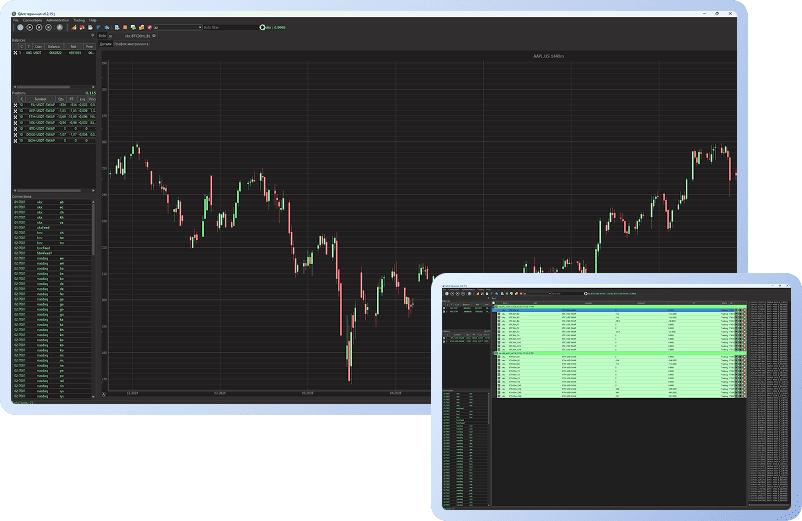
The software includes a graphical shell (terminal) for the convenient administration of user and trading accounts, order management, and algorithm parameter control, as well as an extensive back-end:
- Modules for processing exchange data and converting internal commands
- Modules for working with the database
- A distributed incident monitoring system
- A module for notifying about incidents and account statuses
- A library of trading robots

To enable flexible system development through the addition of new modules, and due to Python’s limitations on CPU usage, the decision was made to use a modular (microservice) architecture with data exchange between modules via ZeroMQ sockets.
qant_terminal — graphical interface for administering trading and user accounts, managing orders and algorithm portfolios, as well as displaying system statuses and order execution results. Written in Python.
qant_lib — a shared library for all modules and their joint interaction, written in Python.
qant_connector — the core of the entire system (referred to as the “connector”). It contains modules for interacting with exchange back-ends (feeds — processing public data; executors — processing private data), which bring all data into a standardized QAnt system format, as well as the order_manager module, which ensures proper interaction between robots (traders) and the corresponding feeds and executors. Written in Python.
qant_managers — modules for managing robots, providing information about robot statuses, connections, balances, positions, and orders from the connector to the terminal and other modules. Written in Python.
qant_telegram_bot — a module for distributing information about incidents, account statuses, and user account states to Telegram and Slack messenger chats. Written in Python.
qant_bots — a library with examples of trading robots and indicators, written in Python.
For ease of use, connections to various exchanges are implemented as plug-in modules. This means there is no need to load all modules at once.
All modules perform similar functions — receiving public market data (anonymized order flows, executed transaction data, candlestick data), exchange account data (account status, orders, execution results/statuses), and other data that can be obtained via requests to the exchange API.
Dependencies
The platform exchanges messages with exchange APIs and depends on them.
It also generates error messages when issues arise and includes a risk management system, so it uses a messaging service.
In addition, communication with trading bots is carried out via message transmission.
Finally, the platform is linked to the hardware on which computations are performed and where data is stored and transmitted.
qant_api_ib — API client for connecting to international brokers that support the FIX/TWS-API protocol.
qant_api_cgate — client for connecting to the Moscow Exchange via the Plaza II connection protocol, written in Python. Software registration has been completed in accordance with MICEX requirements, and the product has been added to the register of software products authorized for use on the Moscow Exchange.
qant_api_freedom — client for connecting to brokers using a similar protocol.
- The platform exchanges messages with exchange APIs and depends on them.
- It also generates error messages when issues occur and includes a risk management system, therefore it uses a messaging service.
- In addition, it communicates with trading bots via message passing.
- Finally, the platform is connected to the hardware layer where computations are performed and data is stored and transmitted.
System Operating Requirements
Installation and Operation
Software (terminal) for administering user accounts and managing trading orders in the QAnt system — Download
Launch instructions:
- Move the .ssh directory to the user’s home directory
- Correct the path to the SSH private key in the settings.ini file (key_file)
- Run qterminal
- Enter login and password
For more details, see the System Operating Requirements file.

Minimum System Requirements
- OS: Linux Qt 5.15 or higher
- Screen: 1024×768 px resolution
- Processor: Intel/AMD-compatible x64, 2 GHz
- Graphics card: 512 MB
- RAM: 75 MB
- Language: Python
- Program size (disk space): 130 MB

Data Backup
Daily data backup includes:
- Creating backup copies of system files
- Creating database backups
Regular database backups are configured using specialized DBMS utilities and OS tools.

Software Lifecycle
The system lifecycle is maintained through support and updates carried out in accordance with the company's own development roadmap.

Support and Maintenance
- Updating the software version
- Processing user requests and addressing issues related to incorrect software operation
- Consulting on software usage (consultations for staff and administrators on functional capabilities, effective use, maintenance, and administration of the software, etc.)
- Updating user documentation

Troubleshooting
Issues identified during system operation may be corrected as follows:
- Providing the user with an archive containing files of the updated system (Terminal) via email or other digital communication channels.

Development Process
- Development of new modules and functions
- Enhancement and optimization of current modules and functions
- Comprehensive testing (unit testing, integration testing, regression testing, and load testing)
- Fixing identified bugs
- Developing documentation and instructions

Software Upgrades/Updates
New versions are released according to the company’s own development roadmap, as well as in the event of issues identified during software operation by end users.
System Licensing Rules
Software
Delivered as an archive containing an executable file. Verification of access keys with the administrator is required to launch the program.

Licensing Policy
Defines the customer's rights to use the system's functionality and is implemented through key administration.
License Cost
License cost is calculated individually and provided upon request via email info@qhill.ru
User Guide
Description of the interface, main sections, and system functions.